

Choosing the right database is one of the most impactful architectural decisions you’ll make on AWS. Pick the wrong one, and you’ll face performance bottlenecks, skyrocketing costs, and painful migrations down the road.
In this article, we’ll break down the differences between SQL and NoSQL databases on AWS, explore the main services available, and give you a practical decision framework so you can choose with confidence.
Understanding the Fundamentals
Before diving into AWS services, let’s make sure we’re on the same page about what sets these two paradigms apart.
SQL (Relational Databases)
Relational databases store data in tables with predefined schemas made up of rows and columns. They use Structured Query Language (SQL) to query and manipulate data and enforce relationships between tables through foreign keys and joins.
Key characteristics:
Structured schema: You define your tables, columns, and data types upfront.
ACID compliance: Transactions are Atomic, Consistent, Isolated, and Durable.
Strong consistency: Reads always return the most recent write.
Vertical scaling: Traditionally scaled by adding more power (CPU, RAM) to a single server.
Complex queries: Excellent support for JOINs, aggregations, and ad-hoc queries.
NoSQL (Non-Relational Databases)
NoSQL databases break away from the rigid tabular model. They come in several flavors, document, key-value, wide-column, and graph, each optimized for different access patterns.
Key characteristics:
Flexible schema: Fields can vary from record to record.
BASE model: Basically Available, Soft state, Eventually consistent.
Horizontal scaling: Designed to scale out across many nodes.
High throughput: Optimized for massive read/write workloads.
Simple queries: Best suited for known access patterns rather than ad-hoc queries.
SQL Databases on AWS
Amazon RDS (Relational Database Service)
Amazon RDS is a managed service that supports six popular relational engines:
MySQL
PostgreSQL
MariaDB
Oracle
SQL Server
Amazon Aurora (MySQL & PostgreSQL compatible)
When to use RDS:
Your data is highly relational with complex relationships.
You need ACID-compliant transactions (e.g., financial systems).
Your team is experienced with SQL.
You want a managed service but with a traditional relational model.
Example use cases: E-commerce order management, HR systems, CMS platforms, ERP systems.
Amazon Aurora
Aurora deserves special attention. It’s AWS’s cloud-native relational database, compatible with MySQL and PostgreSQL but re-engineered for the cloud.
Why Aurora stands out:
5x throughput of standard MySQL, 3x of standard PostgreSQL.
Storage auto-scales up to 128 TB.
6-way replication across 3 Availability Zones.
Supports up to 15 read replicas with minimal lag.
Aurora Serverless v2 scales capacity automatically based on demand.
When to use Aurora over standard RDS:
You need higher performance and availability.
Your workload has unpredictable traffic (Aurora Serverless).
You want automatic storage scaling.
NoSQL Databases on AWS
Amazon DynamoDB
DynamoDB is AWS’s flagship fully managed key-value and document database. It’s designed for applications that need consistent, single-digit millisecond latency at any scale.
Key features:
Serverless: No servers to manage, patch, or provision.
Auto-scaling: Throughput adjusts to traffic automatically (on-demand mode).
Global Tables: Multi-region, multi-active replication.
DAX (DynamoDB Accelerator): In-memory caching for microsecond reads.
Streams: Capture item-level changes for event-driven architectures.
When to use DynamoDB:
You need extreme scale and low latency.
Your access patterns are well-defined and predictable.
You’re building serverless applications (Lambda + API Gateway + DynamoDB).
You need a simple key-value or document store.
Example use cases: Gaming leaderboards, IoT telemetry, session management, shopping carts, real-time bidding.
Amazon DocumentDB (MongoDB Compatible)
If your team already uses MongoDB, DocumentDB provides a managed, MongoDB-compatible document database.
When to use DocumentDB:
You’re migrating from MongoDB.
You need flexible JSON document storage with rich query capabilities.
You want managed infrastructure without running your own MongoDB clusters.
Amazon ElastiCache (Redis & Memcached)
ElastiCache provides in-memory key-value stores for caching and real-time workloads.
When to use ElastiCache:
You need sub-millisecond response times.
You’re caching frequently accessed data from another database.
You need real-time features like session stores, pub/sub messaging, or leaderboards.
Amazon Neptune
Neptune is a graph database for highly connected datasets.
When to use Neptune:
Social networks, recommendation engines, fraud detection.
Your queries involve traversing complex relationships between entities.
Head-to-Head Comparison
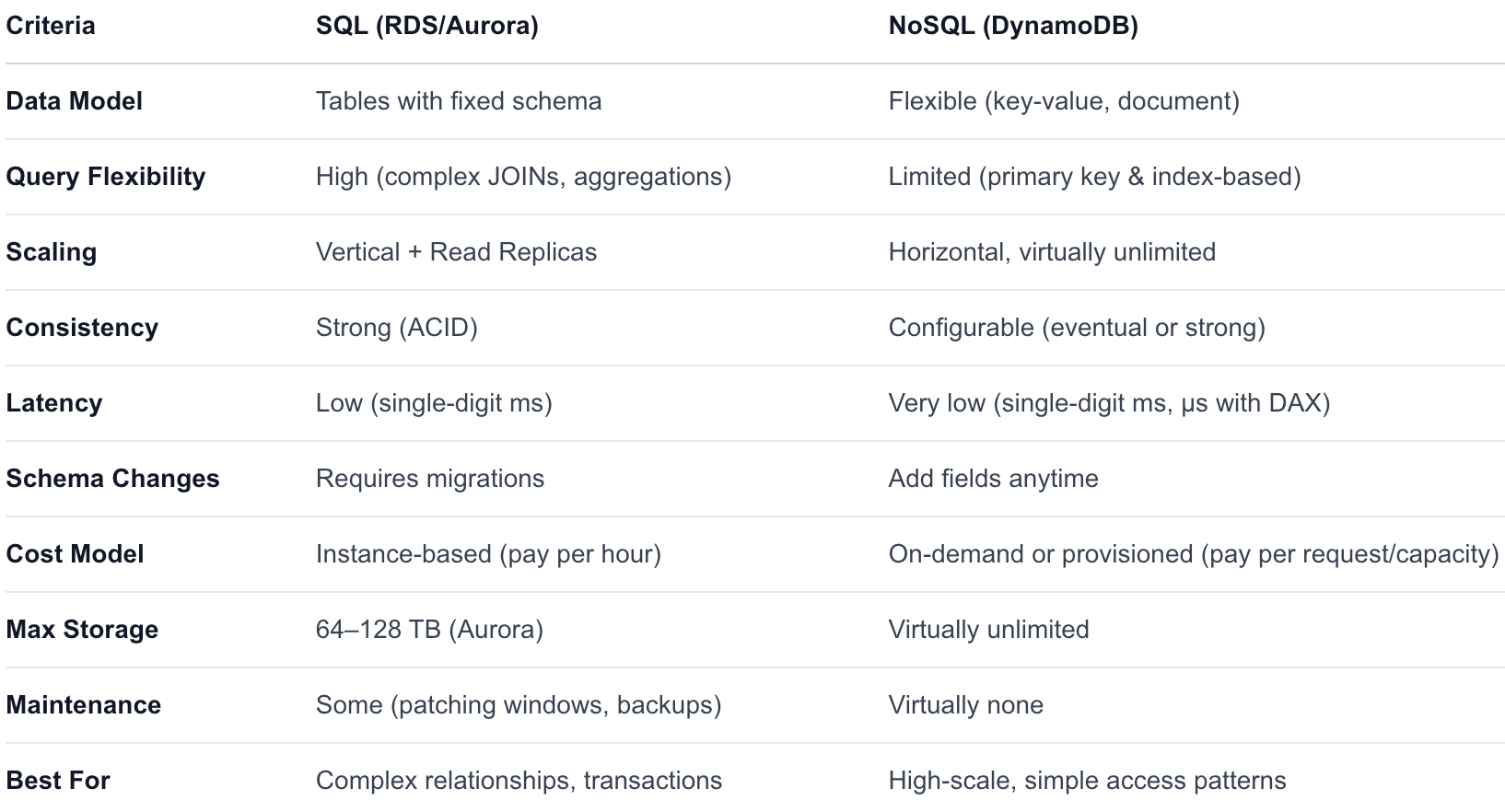
Decision Framework: 7 Questions to Ask Yourself
Use these questions to guide your choice:
1. How relational is your data?
Highly relational (many joins, foreign keys, normalized tables) → SQL
Loosely structured or denormalized → NoSQL
2. How complex are your queries?
Need ad-hoc queries, complex reporting, aggregations → SQL
Known, simple access patterns (get by key, query by index) → NoSQL
3. What’s your scale?
Moderate, predictable traffic → SQL (RDS/Aurora) handles this well
Massive, spiky, or unpredictable traffic → NoSQL (DynamoDB) scales seamlessly
4. What are your latency requirements?
Single-digit millisecond → Both work
Microsecond → DynamoDB + DAX or ElastiCache
5. Do you need ACID transactions?
Complex multi-table transactions → SQL
Simple transactions → DynamoDB Transactions may be sufficient
6. Are you building serverless?
DynamoDB integrates natively with Lambda, API Gateway, and EventBridge.
RDS in serverless architectures can be problematic (connection limits), though Aurora Serverless v2 and RDS Proxy help.
7. What’s your budget model preference?
Predictable monthly cost → RDS (reserved instances)
Pay-per-use → DynamoDB on-demand mode
Real-World Scenarios
Scenario 1: E-Commerce Platform
Requirements: Product catalog, orders, inventory, payments.
Recommendation: Aurora PostgreSQL + DynamoDB (hybrid)
Use Aurora for orders and payments (ACID transactions, complex queries).
Use DynamoDB for the product catalog and shopping cart (high read throughput, flexible attributes).
Use ElastiCache Redis for session management and caching.
Scenario 2: Real-Time Gaming Backend
Requirements: Leaderboards, player profiles, matchmaking, millions of concurrent users.
Recommendation: DynamoDB
Scales horizontally to handle millions of players.
Single-digit millisecond latency for leaderboard reads/writes.
Global Tables for multi-region play.
Scenario 3: Financial Reporting System
Requirements: Complex queries, regulatory compliance, audit trails, historical analysis.
Recommendation: Aurora PostgreSQL
Full ACID compliance for transaction integrity.
Complex SQL queries for financial reporting.
Point-in-time recovery for audit requirements.
Scenario 4: IoT Data Platform
Requirements: Millions of devices sending telemetry every second.
Recommendation: DynamoDB + Amazon Timestream
DynamoDB for device state and metadata.
Timestream (purpose-built time-series DB) for telemetry data.
The Hybrid Approach: Why Not Both?
In practice, many production systems on AWS use both SQL and NoSQL databases. This is called polyglot persistence, using the best database for each specific job.
┌──────────────┐     ┌──────────────────┐     ┌──────────────┐
│   Frontend   │────▶│   API Gateway +  │────▶│  DynamoDB    │
│   (React)    │     │   Lambda         │     │  (Catalog,   │
└──────────────┘     └──────┬───────────┘     │   Sessions)  │
                            │                 └──────────────┘
                            │
                            ▼
                     ┌──────────────────┐     ┌──────────────┐
                     │   ECS / EKS      │────▶│  Aurora       │
                     │   (Order Service)│     │  (Orders,    │
                     └──────────────────┘     │   Payments)  │
                                              └──────────────┘
Tips for a hybrid approach:
Use DynamoDB for high-throughput, simple-access workloads.
Use Aurora for transactional and reporting workloads.
Use ElastiCache as a caching layer in front of either.
Use Amazon EventBridge or DynamoDB Streams to sync data between databases when needed.
Final Thoughts
There’s no universal “best” database, only the best database for your specific use case. The most important thing is to start with your access patterns and requirements, not with the technology.
Ask yourself:
What does my data look like?
How will I query it?
How much will it scale?
What consistency guarantees do I need?
Let the answers guide you to the right choice. And remember, on AWS, you’re never locked into one paradigm. Embrace polyglot persistence and use the right tool for each job.