

Canary deployments are one of the most powerful risk mitigation strategies available to cloud engineers working with AWS API Gateway and Lambda. They allow you to test new versions of your APIs in production with real traffic while minimizing the blast radius of potential issues. Understanding how they work and when to use them can be the difference between a smooth rollout and a production incident.
Sponsored by Salesforce

Stream the developer conference of the year. Live on Salesforce+.
Agentic AI is changing the game and Agentforce is leading the way. Stream TDX to join dozens of sessions and virtual hands-on trainings that explore the latest innovations across Agentforce, Data 360, the core platform, vibe coding, Slack, and more. All free on Salesforce+.
Tune in to TDX on Salesforce+ to:
Build hands-on skills with virtual trainings and live demos
Get roadmap insights from the leaders shaping what’s next
Access broadcast-only moments and exclusive interviews
It all kicks off with the main keynote, where you’ll experience the future of software and learn how to build it. Add it to your calendar so you don’t miss a moment.
👉 Register for free
What Are Canary Deployments?
A canary deployment is a progressive rollout strategy where you route a small percentage of production traffic to a new version of your application while the majority continues using the stable version. The term comes from the historical practice of using canaries in coal mines as early warning systems, if something goes wrong with the new version, only a small subset of users are affected.
In API Gateway, canary deployments work at the stage level. When you create a canary, you’re essentially splitting traffic between two versions of your API: the base deployment and the canary deployment. Each can point to different Lambda function versions or aliases, allowing you to test new code with real production traffic.
How Canary Deployments Work with Lambda
The integration between API Gateway canary deployments and Lambda is straightforward but powerful. When you deploy a canary in API Gateway, you specify a percentage of traffic to route to the canary version, typically starting with 5-10%. The remaining traffic continues flowing to your stable base deployment.
API Gateway uses a weighted random distribution to split traffic. This means if you set a 10% canary weight, approximately 10% of requests will hit your canary Lambda function version, while 90% go to the base version. The distribution happens at the request level, not the user level, so individual users might experience both versions during a canary deployment.
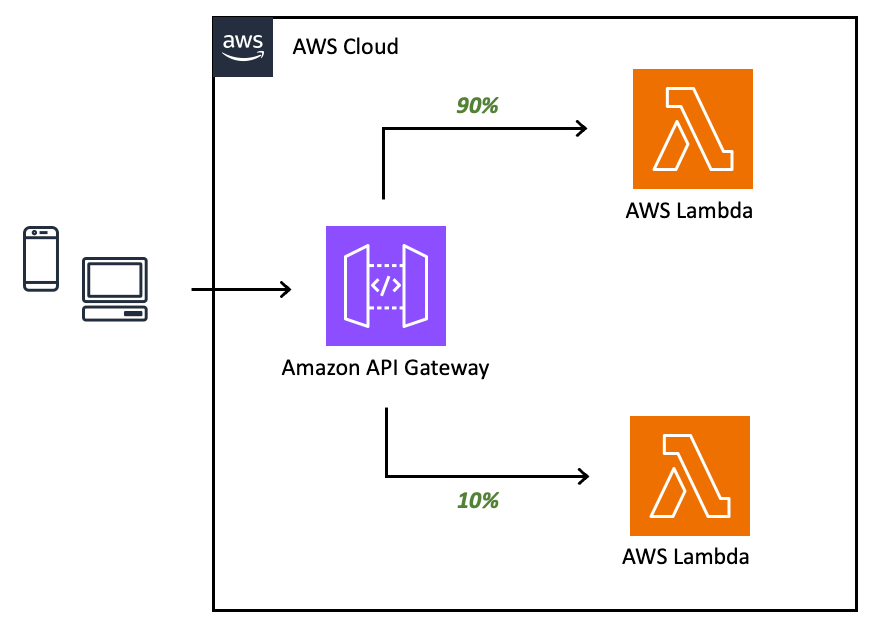
The key is that both deployments exist simultaneously in the same stage. Your base deployment might point to Lambda alias “production” running version 5, while your canary points to alias “canary” running version 6. This allows you to validate new functionality with real traffic patterns before committing to a full rollout.
Practical Tips for Success
Start Small and Increase Gradually: Begin with 5-10% traffic to your canary. Monitor metrics closely for 15-30 minutes before increasing. A common progression is 10% → 25% → 50% → 100%, with monitoring periods between each increase.
Use Lambda Aliases, Not Versions Directly: Always point your API Gateway integrations to Lambda aliases rather than specific versions. This gives you flexibility to update what version an alias points to without redeploying your API. Use one alias for production traffic and another for canary testing.
Monitor the Right Metrics: Focus on error rates, latency percentiles (especially p99), and business-specific metrics. Don’t just watch averages, a 1% error rate on your canary means 1 in 100 of your customers are having problems. Set up CloudWatch alarms that compare canary metrics against baseline metrics.
Implement Proper Logging: Ensure your Lambda functions log which version they are. Include version information in structured logs so you can quickly filter and compare behavior between canary and base deployments during troubleshooting.
Have a Rollback Plan: Know how to quickly promote your canary to 100% if it’s successful, or delete it entirely if problems arise. Practice these operations in non-production environments. The API Gateway console and CLI both support these operations, but automation through CI/CD pipelines is ideal.
Consider Stage Variables: Use API Gateway stage variables to pass configuration to your Lambda functions. This allows the same Lambda code to behave differently based on whether it’s handling base or canary traffic, useful for feature flags or environment-specific settings.
Test with Realistic Load: Canary deployments are most valuable when they experience real production traffic patterns. Avoid deploying canaries during low-traffic periods if possible, you want enough requests to generate statistically significant results.
Don’t Rush the Process: The entire point of canary deployments is risk reduction. If you promote a canary to 100% within minutes, you’re not giving yourself time to detect issues. Plan for canary periods of at least several hours for critical APIs.
When to Use Canaries
Canary deployments shine when rolling out significant changes: new business logic, performance optimizations, dependency updates, or architectural changes. They’re less critical for minor bug fixes or configuration changes, though the safety they provide is always valuable.
The overhead of managing canaries is minimal compared to the protection they offer. For production APIs serving real customers, canary deployments should be your default deployment strategy, not an exception.